





E-learning module "Linux Basics"
Overview: The File System
In Linux, files and directories are organized as a tree. The root directory is /.
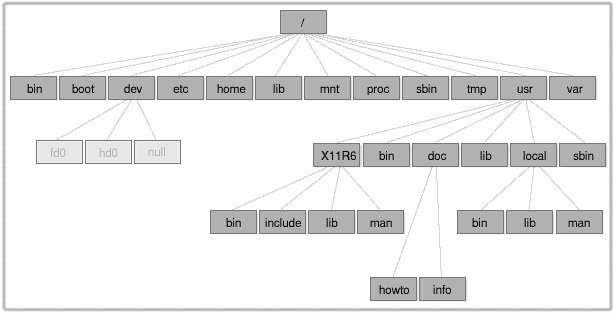
There are no drives as in Windows. Hard disk partitions, CD-ROMs, or USB storage devices are mounted to directories and are parts of the directory tree.
The path separator on Linux is /.
Some directories are described in the Filesystem Hierarchy Standard (FHS).
/bin/ → Various programs (binaries) which are important for users and administrators./dev/ → Contains files (interfaces) for hardware access (e.g. /dev/cdrom, /dev/fd0, /dev/sda1)./etc/ → (Local) configuration files./home/ → Below are the personal user directories. Typically one directory per user./lib/ → Libraries required by programs./tmp/ → In this directory, temporary files are stored. (Cleaned regularly.)/opt/ → Contains optional packages./proc/ → Is a virtual directory, containing diverse status messages from system or processes./sbin/ → Important system programs (requiring root permissions!) which are necessary for system start./root/ → Administrator directory./var/ → Changeable data, for example spool or lock./boot/ → Contains files belonging to the kernel and the boot manager. /usr/ → This directory is special. It contains serveral directories again.
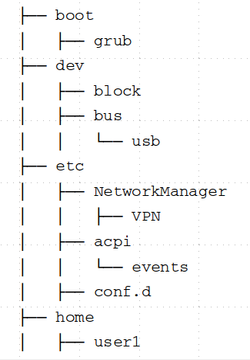
The command tree displays structured output of directories and files to the console. Attention: This command is not always installed by default.
 | The content of this e-learning module is licensed under the Creative Commons Attribution-NonCommercial-ShareAlike 3.0 Germany license (CC BY-NC-SA 3.0 DE). |